Estate document organization software for your records
Estate document organization software in Settled Estate keeps files with one estate workspace. the preview is free and the complete plan costs $19.99 once per estate. Offer checked 2026-10-01.
Free preview and 10 assistant questions. Working tools cost $19.99 once per estate. See what is included.
By Settled Estate Editorial Team · Checked
Estate papers arrive from courts, banks, insurers, appraisers, tax agencies, buyers, and family members. Settled gives the paid estate workspace a place to upload and retrieve those files so the person doing the work can reach them beside the task, inventory, ledger, and family record. A downloadable estate packet and data export provide separate handoff formats.
Settled does not draft, sign, notarize, file, or certify legal documents. It also does not promise that an uploaded copy replaces an original or certified copy. Keep the format required by the court or organization, preserve originals, and use the workspace as an organized working set.
What we checked. Settled document storage, packet, data export, and collaborator details were checked on September 9, 2026. The review did not cover every file type and was not a security certification.
See the working tools
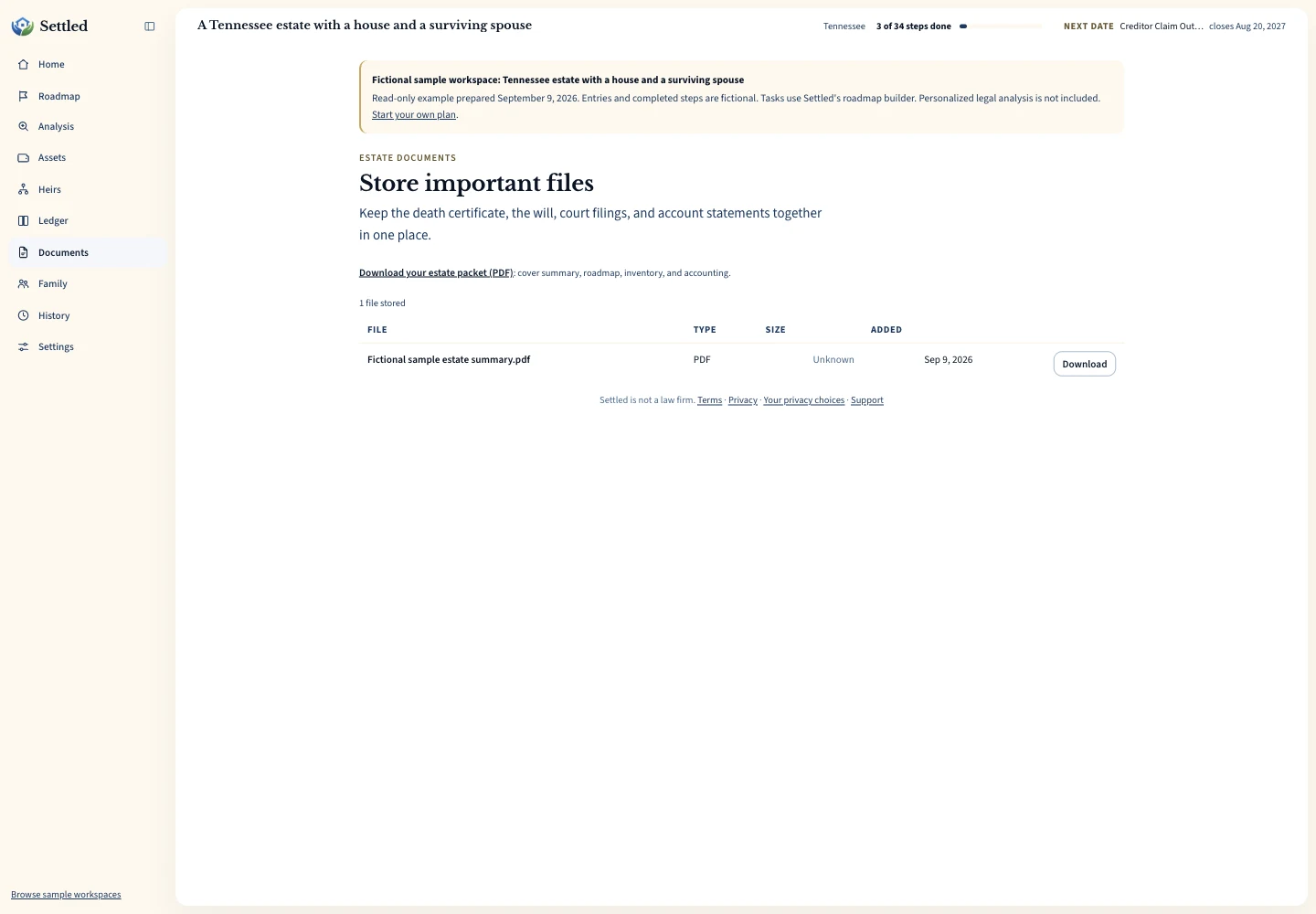
Inspect the same fictional records as a PDF summary, CSV ledger or data export.
What to keep in estate document organization software
Start with identity and authority records: the death certificate, will and codicils, appointment petition, issued letters or court certificate, and any order that affects what the representative may do. Keep drafts clearly labeled. A scan of a signed document should not share a filename with the unsigned draft it replaced.
Add asset and money support: statements, deeds, titles, beneficiary forms, appraisals, invoices, receipts, cancelled checks, closing statements, and distribution acknowledgments. Match filenames to the records they support. A date, organization, document purpose, and safe account reference usually make a better name than “scan 4.”
Add communications and tax records when they matter to the estate history. Preserve the complete notice or letter, not only a screenshot of one paragraph. Keep filed tax returns and professional workpapers according to the professional's retention guidance. Settled's file list helps retrieval, but it does not set a legal retention period.
Use filenames that survive a long estate
Pick one naming pattern and teach it to every collaborator. A practical pattern is year-month-day, organization or person, document type, and a short safe reference. An example is “2026-08-14 Community Bank statement 1842.pdf.” Avoid full account numbers, Social Security numbers, passwords, or other secrets in filenames because names appear in routine file lists.
Keep versions visible. Add “draft,” “signed,” “filed,” or “court-stamped” only when that word is true. If a corrected document replaces an earlier one, preserve the earlier version when the history matters and state which file controls. Do not rely on the upload date to tell you when a document was signed, mailed, or filed.
Pair the filename with a task or ledger description. The task “request date-of-death brokerage statement” can point to a file with that purpose. An appraisal invoice can match an expense entry by vendor, date, and amount. That consistency helps a later reviewer trace a number or completed task to its source without opening the whole folder.
Upload, check, and retrieve estate files
The paid document workspace accepts files through a browser picker or drag and drop, and a mobile device can offer its camera for a new image. Settled currently limits an upload to 25 MB. Open the saved file after upload and check the first and last page, orientation, legibility, and filename. A successful upload alone does not show that every page was captured clearly.
Download a file when you need to send it through an approved channel or work outside the workspace. Do not assume a collaborator has downloaded the latest version. Point to the exact filename and version, and ask the recipient to confirm. Sensitive documents should travel through a method suitable for the recipient and information involved.
A file can be removed from the workspace. Check whether another record or person still needs it before removal. Keep required originals and an independent backup. No single web account should be the only place where irreplaceable wills, issued court papers, tax records, or closing documents exist.
Connect documents with tasks, assets, and expenses
Store the source after completing a task. If the task was to request letters, upload the issued paper and record the appointment date from the actual document. If the task was to value an account, upload the statement and add the supported figure to the estate inventory. Keep the source and the entered fact consistent.
Financial documents should explain ledger entries. Pair receipts and invoices with the executor expense record. Pair bank exports with the imported period and retain the official statement used for review. Pair an asset sale with its closing statement and net proceeds rather than creating an unexplained cash entry.
When a source changes a prior answer, update the workspace and note the reason. A newly found beneficiary form may change the asset's probate status. Issued letters may supply a missing date anchor. A corrected bill may change an amount. Preserve the trail so a reviewer can see that the current record follows the newer source.
Use the estate packet and data export for different handoffs
The paid workspace can produce a PDF estate packet with a summary, plan, inventory, and accounting. That format can help a family member, attorney, or accountant review the entered story. It does not contain every uploaded source file and is not a jurisdiction-approved probate form. Bring the supporting statements, receipts, and papers the reviewer requests.
Settled also provides a full JSON data export. JSON preserves structured workspace data for portability or technical review. It is not a polished filing and may require software to inspect comfortably. Keep both the readable packet and structured export when leaving the workspace, along with copies of the source documents themselves.
Review the public fictional outputs to understand the formats: a sample estate summary PDF, a sample estate ledger CSV, and a sample estate JSON export. These files contain invented demonstration data. They do not show how a court or professional reviewed a real estate.
Review before handoff. Remove stray drafts, identify open questions, and state which figures remain estimates. Confirm the recipient's preferred format and secure delivery method. The export helps move information; it does not transfer legal responsibility, submit documents, or confirm that the recipient has accepted the record.
Preserve records needed for tax review
Estate tax and income-tax work may draw on documents from both the decedent and the estate. Publication 559 discusses final individual returns, estate income, gains and losses, beneficiary reporting, and related forms. Read the current IRS publication with a qualified tax professional. Settled does not prepare those returns.
Keep the source for date-of-death values, income received after death, expenses, sales, and distributions. A bank statement, brokerage tax document, appraisal, or closing statement may answer a question that the workspace summary cannot. The IRS Form 1041 instructions say books and records related to a form should be retained as long as their contents may matter in the administration of federal tax law.
Ask the tax preparer which documents they need, how they want them delivered, and how long the estate should retain them. Keep filed copies and notices outside the preparer's portal as well. A document organizer supports retrieval; the professional and official guidance set the filing and retention decisions.
Choose document software by the whole record, not storage alone
A simple folder may be enough when one person has a few files and a reliable backup. Settled fits when documents support a changing task plan, asset inventory, expense record, accounting, and family workflow. The value comes from keeping those parts in one estate context, while retaining source files and backups outside it where appropriate.
Look elsewhere when you need legal document drafting, electronic filing, notarization, formal records-management retention controls, document-only guest permissions, or a professional firm's multi-client matter system. Settled does not claim those functions. A dedicated secure file service may also fit when storage and controlled external sharing are your only requirements.
Settled's preview and 10 assistant questions are free. The complete plan costs $19.99 once for one estate and opens document storage, the fuller plan, working records, packet, generated details in exports, collaboration, and unlimited assistant questions. Review the current offer on the Settled workspace page before deciding where your estate files should live.
Frequently Asked Questions
Does Settled create or file probate documents?
Can I upload a death certificate or will?
What is the current upload limit?
Does the estate packet include every uploaded document?
Can family collaborators see documents?
Keep working through your options
Learn what letters show and why organizations may ask for them.
Executor document checklistSee common papers to gather across the estate process.
Estate accounting softwareConnect statements and receipts with reviewable financial output.
Executor software overviewReview the complete estate workspace and free preview.
Sources and checking dates
Product pages can change between checks. Confirm the price, included features and terms on the provider’s site before paying.
- The Settled Workspace: Probate, Step by Step. Settled Estate. Publication date not stated. Checked 2026-10-01.
- Request deceased person's information. Internal Revenue Service. Publication date not stated. Checked 2026-09-09.
- Instructions for Form 56 (06/2026). Internal Revenue Service. Published June 2026. Checked 2026-09-09.
- Publication 559 (2025), Survivors, Executors, and Administrators. Internal Revenue Service. Published 2026. Checked 2026-09-09.
- Instructions for Form 1041 and Schedules A, B, G, J, and K-1 (2025). Internal Revenue Service. Publication date not stated. Checked 2026-09-09.
Settled Estate is not a law firm, and this content is for informational purposes only and does not constitute legal advice. Probate laws and procedures in your state can change. Consult with a qualified attorney for advice specific to your situation. Full disclaimer.