Settle an estate step by step, in one workspace
Estate settlement software from Settled Estate gives families, administrators and executors one place for tasks, assets, expenses, documents and shared work. Start with a free preview and 10 assistant questions. The complete workspace costs $19.99 once per estate, checked October 1, 2026.
By the Settled Estate Editorial Team · Checked
For the person doing the work after a death
You may be a surviving spouse gathering statements, an adult child sorting a parent’s affairs, an administrator handling an estate with no will, or an executor appointed by a court. You can start before every answer is known. The intake asks about your role and what you know about the estate so the workspace can reflect the situation you describe.
A workspace helps you organize information; your legal authority comes from the documents and rules that apply to the estate. Being named in a will, being a family member and being appointed by a court are different situations. Keep the appointment papers with your records and confirm your authority before signing, moving money or distributing property.
Serving as executor? The executor software guide walks through the tools for that role. If you are still learning what the role involves, start with our executor of estate guide. Settled also supports people whose estate may use a small-estate process or involve transfers outside probate; the information you enter helps identify what to check.
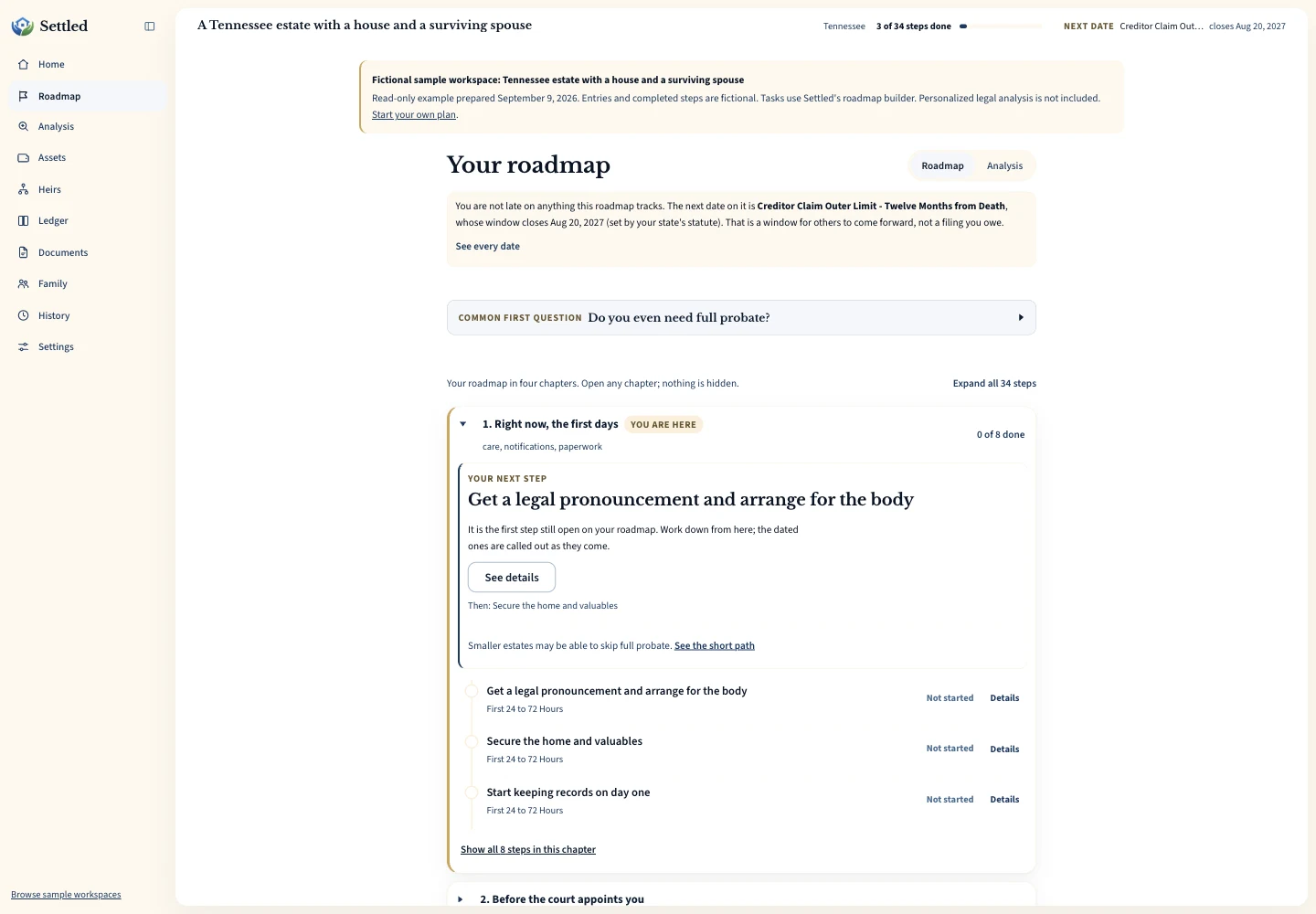
See an estate workspace before you start
How it works
- 1
Answer a few questions
Tell us the state, date of death, what you know about the assets and whether there is a will. You can say when you are unsure. No card required.
- 2
See what your estate involves
Preview the number of suggested steps and statute-set dates, plus the first dated deadline when the facts needed to calculate it are known.
- 3
Open the plan and work it
The paid workspace opens the full suggested task list, date tracking, assets, ledger, accounting statement, documents, reminders and collaboration.
What you can do in the workspace
Keep the tasks, numbers and documents you are working with in one estate workspace. The tools help organize your records while you check the rules and instructions that apply.
Statute-cited deadlines
Dates use the event named in the rule, such as death, appointment or publication. When an event date is missing, the task stays conditional. Check the cited source and your court’s instructions.
A working task checklist
Mark tasks in progress, done, or not applicable. Your progress is saved and picks up where you left off.
Assets, ledger, and accounting
Record estate assets, receipts, payments and distributions. Build a charge-and-discharge statement from your entries. Compare it with bank records and any filing format your court requires.
Document storage
Keep the will, letters, statements, and receipts with the estate they belong to instead of a folder on someone’s desk.
Bring in a co-executor
Invite a trusted sibling or co-executor to work in the same estate. Collaborators can edit; adding an heir’s contact record does not grant access.
An assistant that knows your estate
Ask what a task means or what your accounting shows. It reads your estate’s data and explains the general process for your state. Not legal advice.
Free shows you the suggested step count and the first statute-cited deadline when it can be calculated. Everything on this list comes with the complete plan. The table below draws the line exactly.
Free and complete plans
Starting is free: the questions, how many steps and statute-set dates your estate carries, the first deadline when it can be calculated, and 10 questions to the estate assistant. You can also export the records you entered. The complete plan is a one-time $19.99 payment per estate (50% off the regular $39.99 price) that opens the full task list and every tool above. There is no subscription in either plan.
30-day money-back guarantee, no reason needed. Email [email protected] within 30 days of your purchase and we refund the full amount. Read the refund policy.
| What you get | Free | Complete ($19.99 once per estate) |
|---|---|---|
| Answer the questions and create your estate | Included | Included |
| Suggested step count and statute-set date count | Included | Included |
| First statute-cited deadline when its date can be calculated | Included | Included |
| Full suggested task list and dates, including conditional tasks | Not included | Included |
| Asset inventory and estate ledger | Not included | Included, unlimited |
| Estate assistant questions | 10 included | Unlimited |
| Export the data you entered (JSON and ledger CSV) | Included | Included |
| Task checklist, accounting statement, document storage, collaborator invitations, heir contacts, email reminders, PDF estate packet and generated plan details in exports | Not included | Included |
Wondering what the process itself costs? See what probate costs and the per-state fee calculator.
Start where you are
A few questions, then a free preview of your plan. Free, no card required.
One-time payment for the complete plan. No subscription either way. 30-day money-back guarantee, no reason needed. Refund policy.
Choose the tools around the work you have
Start with an asset inventory if you are still finding accounts and property. Record where each value came from and keep uncertainty visible. A balance on a later statement may differ from the value you need for a date-of-death inventory. The workspace records your entries; it does not appraise a house, find hidden accounts or decide whether a disputed asset belongs in the estate.
Use expense tracking for estate payments and costs someone paid personally. Record the payer, purpose and supporting receipt. A reimbursement record helps you assemble the facts; it does not decide whether payment is allowed. The accounting tools bring recorded receipts, expenses and distributions into a statement for review.
The task tools keep suggested work and event-based dates together. Add the appointment or publication date when you know it, and review any court order that changes the dates for this estate. Completing a checkbox records your progress. It does not file a document, notify an agency or establish that the court has accepted a step.
For joint work, review family sharing permissions before inviting anyone. Collaborators can edit the estate. If someone only needs an update, consider sharing a reviewed export instead. Keep documents and receipts with the estate, while retaining originals and any certified copies an institution requires.
Settled does not draft your will, act as a professional trustee, file court documents for you or replace an attorney or tax professional. If you want someone to manage the estate on your behalf, read about estate settlement companies. If you want to do the work with software, compare executor software by price, accounting needs, state support and the help each provider offers.
Compare Settled with other ways to organize an estate
We make Settled, so we have a commercial interest in your choice. Our comparisons state what we checked, where another provider may fit better and what remains unverified. Start with the executor software buyer’s guide, or compare Settled with EstateExec, SwiftProbate, Executor.org, Atticus or a spreadsheet.
Frequently Asked Questions
What is free, and what costs money?
Do I need to create an account?
Which states does it support?
What does the complete plan add for $19.99?
Can I use Settled if I am not the executor?
Does Settled connect directly to my bank?
Is this legal advice?
There is no rush on this. When you are ready, a short assessment can help you see whether probate is needed.
Settled Estate is not a law firm, and this content is for informational purposes only and does not constitute legal advice. Probate laws and procedures in your state can change. Consult with a qualified attorney for advice specific to your situation. Full disclaimer.