Executor software for the work ahead
Executor software from Settled Estate organizes one estate in one workspace. the preview and 10 assistant questions are free; the complete plan costs $19.99 once per estate. Offer checked 2026-10-01.
Free preview and 10 assistant questions. Working tools cost $19.99 once per estate. See what is included.
By Settled Estate Editorial Team · Checked
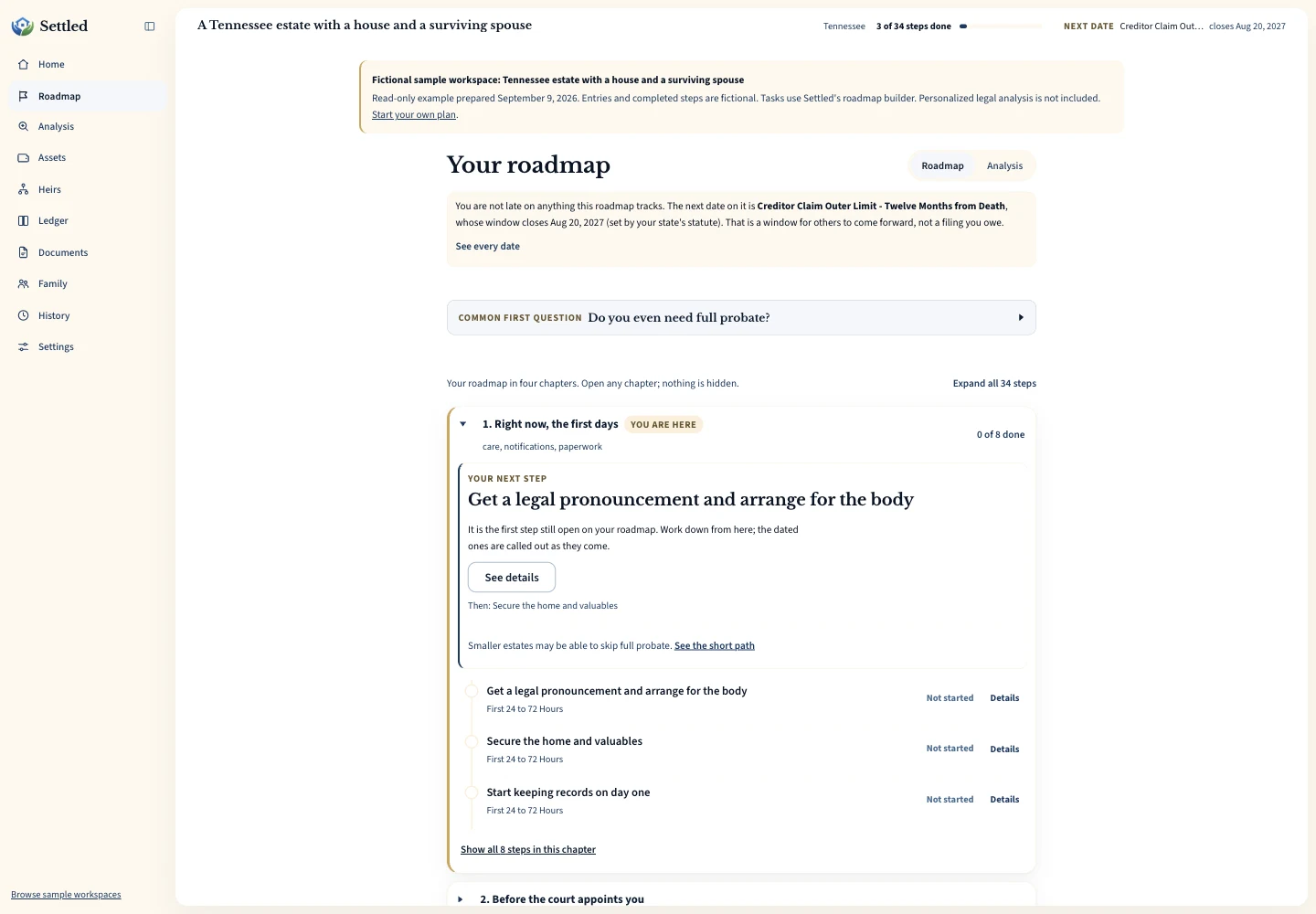
The work after a death rarely arrives in a neat order. A bank asks for appointment papers, a relative remembers another account, a bill arrives, and a court date may depend on a step that has not happened yet. Settled gives the person coordinating that work a place to record what is known, mark what is still uncertain, and carry the same facts from the task list into the inventory, ledger, documents, and family workspace.
You can start as an appointed executor or administrator, a person named in a will who has not been appointed, or a relative helping someone else. The workspace does not create legal authority. Banks, courts, tax agencies, and other organizations decide what proof they need. The IRS asks for proof of authority when a personal representative requests a deceased person's tax information. See the broader Settled workspace or read how appointment documents work.
What we checked. Settled product details were checked on September 9, 2026. The page describes the current workspace and clearly labeled fictional examples. A court, bank, attorney, or tax professional may require different records or formats.
See the working tools
Inspect the same fictional records as a PDF summary, CSV ledger or data export.
Who can use executor software before and after appointment
“Executor” is often used as a plain-language label for the person handling an estate, but the formal title depends on the will and the court process. The IRS describes a personal representative as an executor, administrator, or another person in charge of estate property, while its Form 56 instructions distinguish court-authorized executors, court-appointed administrators, and narrower situations without an appointment. Read those distinctions in IRS Publication 559 and the Form 56 instructions.
Settled accounts for those different starting points. A person named in a will can begin by collecting facts and listing questions without claiming to have power to close an account or transfer property. An appointed representative can add the appointment date and use it where a dated step depends on that event. A no-will administrator can organize the same categories of work under the title the court uses. A surviving spouse, adult child, sibling, or friend can help gather records even when another person will act.
This distinction matters when choosing software. If you need a professional to take over phone calls, prepare filings, or represent the estate, a self-directed workspace will not supply that service. If you need one place to understand the process and maintain the working record, software may fit. Start with the free preview before paying. It lets you see how the estate's answers shape the plan without assuming that probate is required.
A fictional estate walkthrough from first question to usable record
Consider a fictional estate for Maria, whose adult son Devon is named in her will. Devon has not received letters yet. He answers what he knows, marks the appointment status accurately, and gets a preview of the likely work. The plan can show a dated item when the needed facts are available and can identify a missing event when they are not. Devon records the date of appointment after the court issues the papers instead of pretending every date runs from Maria's death.
Next, Devon adds Maria's checking account, home, car, and retirement account. He marks beneficiary status as unknown where he has not reviewed the title or account paperwork. He records the home's date-of-death value when he receives it, then records sale proceeds after a later sale. The unknown label preserves the question instead of silently placing the asset inside or outside the probate estate.
Devon downloads a CSV file from the estate account and maps its date, description, and amount columns into the ledger. He reviews each proposed row before importing it. A duplicate flag catches a matching date, amount, and normalized description. He adds the filing fee he paid personally as a reimbursable item and keeps its receipt with the estate files. Settled then groups inventory, receipts, payments, distributions, gains or losses, and the balance on hand into a charge-and-discharge statement for review.
Devon invites his sister as a collaborator. She can work in the shared estate and her changes can be attributed in the activity record. Devon can revoke an unused invitation or remove access later. This fictional story illustrates the workflow only. It does not say Maria's property belongs in probate, that Devon may act before appointment, or that the generated statement matches his court's required form.
What the executor workspace keeps connected
The main benefit of executor software appears when one fact serves more than one part of the work. An asset's value belongs in the estate inventory. If that asset is later sold, the proceeds and any recorded gain or loss also affect the estate accounting. A personal payment belongs in the executor expense tracker, while its receipt belongs with the estate's files. That connection reduces the need to rebuild the story at the end.
Tasks form another connection. Settled can save task status and dated milestones, then bring upcoming work back to attention through reminders. Some dates can be calculated only after an appointment, publication, or another event. The task management workspace keeps an unknown anchor visible until you can supply it. It does not replace the notice from a court, the terms of a will, or advice about a disputed deadline.
Documents and people complete the record. Store files you want available with the estate, then use family sharing when another person should help edit the work. An heir contact record alone does not grant access. Access comes through a collaborator invitation, and a collaborator is an editor, not a beneficiary-only viewer.
What is free and what the $19.99 complete plan adds
The free preview comes first. You answer questions about the estate and see an initial view of the likely work. You can ask 10 questions in the estate assistant. No card is required for that preview. The complete plan costs $19.99 once for that estate and opens the working tools, including the fuller task plan, unlimited assets and ledger entries, documents, collaborators, reminders, estate packet, full generated plan details in exports, and unlimited assistant questions. You can export the data you entered without a paid plan. The current offer is described on the Settled product page.
“Once” refers to a single estate, not a lifetime license for any number of estates. This structure tends to fit a family member handling one death. A professional managing many client estates may need client administration, staff permissions, billing controls, and reporting that this family workspace does not claim to include.
Price should come after fit. Use the preview to check whether the plan asks the right questions for your role and state. Settled currently reads its supported coverage from the same current state list used across this site, which contains 50 available states and D.C. If your state is absent, the workspace should not be your only process reference.
How to choose software for the estate you are handling
Begin with the hardest part of your estate. A small estate with a few accounts may need a clear task sequence and a shared record more than deep accounting. An estate with a home, investment sales, recurring income, and several distributions needs stronger transaction detail. A contested estate or one with tax uncertainty calls for professional judgment; software can hold the facts you bring to that professional.
Check how a product handles uncertainty. Asset ownership may be unclear before you see a deed or beneficiary form. A date may be unknown before notice is published. Software that forces a yes-or-no answer too early can create a clean-looking but unreliable record. Settled includes unknown states for asset beneficiary status and conditional date anchors, so a missing fact remains work to resolve.
Check the money workflow with your actual source files. Settled accepts CSV and TSV data through a reviewed mapping step. It does not connect directly to a bank feed. If automatic bank downloads matter more than guided estate work, compare that requirement directly. If you already keep a careful spreadsheet, read the comparison between executor software and spreadsheets before moving the record.
Finally, decide who needs access and what they should be able to do. Settled collaborators can edit the estate workspace. That works for a co-executor or trusted helper. It does not serve as a read-only update portal for every beneficiary. Choose access based on the work someone will do, and share legal or financial details only with people who should receive them.
What executor software cannot decide for you
Software can organize facts and show source-backed general information. It cannot appoint you, determine whether a will is valid, settle a title dispute, decide who inherits, or authorize a transfer. The IRS Form 56 instructions show why role precision matters: a court-authorized executor and a person holding property without an appointment do not present the same basis of authority. Keep the title you enter consistent with the papers you actually hold.
The accounting output also has a defined limit. Settled calculates a charge-and-discharge view from what you record. An internally balancing result does not independently compare each entry with a bank statement, prove that all property was found, or satisfy a local court form. Review the statement against account records and ask the court, an attorney, or an accountant what format your estate requires.
Tax work remains separate. IRS Publication 559 explains that personal representatives may need to collect assets, pay creditors, file tax returns, and distribute what remains. A Settled task or ledger entry helps you maintain the working record. It does not prepare a federal or state return. Bring the export and supporting files to the tax professional who is assessing the estate.
A practical first session in Settled
Set aside the will, death certificate, any court appointment paper, a recent statement for each known account, and a list of urgent bills. Answer only what you know. Choose “unknown” where the ownership or beneficiary status has not been checked. Record your current role accurately. If another person is the appointed representative, coordinate with that person before changing property or accounts.
Read the preview from top to bottom once. Note which dates already have enough facts and which ones wait for a later event. Add the known assets without treating the first total as final. Enter urgent estate payments and any personal outlay separately. Upload supporting files with names you will understand months later. Then decide whether another trusted helper needs collaborator access.
After that first pass, choose one unresolved question to verify with an official source. It may be the court's appointment process, a bank's document request, or an accountant's treatment of income received after death. The executor checklist offers a printable overview, while the software holds the changing record as answers arrive.
Frequently Asked Questions
Can I use Settled before the court appoints me?
Is Settled only for executors named in a will?
Does Settled connect to an estate bank account?
Does the software file probate forms or tax returns?
What do I get before paying $19.99?
Keep working through your options
Sources and checking dates
Product pages can change between checks. Confirm the price, included features and terms on the provider’s site before paying.
- The Settled Workspace: Probate, Step by Step. Settled Estate. Publication date not stated. Checked 2026-10-01.
- Publication 559 (2025), Survivors, Executors, and Administrators. Internal Revenue Service. Published 2026. Checked 2026-09-09.
- Instructions for Form 56 (06/2026). Internal Revenue Service. Published June 2026. Checked 2026-09-09.
Settled Estate is not a law firm, and this content is for informational purposes only and does not constitute legal advice. Probate laws and procedures in your state can change. Consult with a qualified attorney for advice specific to your situation. Full disclaimer.