Executor task management software for the work ahead
Executor task management software in Settled Estate turns estate facts into an organized plan. the preview and 10 assistant questions are free; the complete plan costs $19.99 once per estate. Offer checked 2026-10-01.
Free preview and 10 assistant questions. Working tools cost $19.99 once per estate. See what is included.
By Settled Estate Editorial Team · Checked
An executor's list changes as facts arrive. Appointment papers may open access to an account. A publication date may start a new waiting period. An asset discovery can add valuation, tax, or transfer work. Settled keeps the task list beside the estate facts that shape it, so the plan can change without losing the record of what has been completed.
Dates deserve special care. Settled uses the date of death, appointment, publication, and other known events where the relevant rule calls for them. A missing event remains an open anchor rather than becoming a made-up date. The software provides general information and organization. Verify procedural dates with the court, an official source, or counsel.
What we checked. Settled task, date, reminder, and plan details were checked on September 9, 2026. State scenarios differ, and reminder email delivery was not exercised during that review.
See the working tools
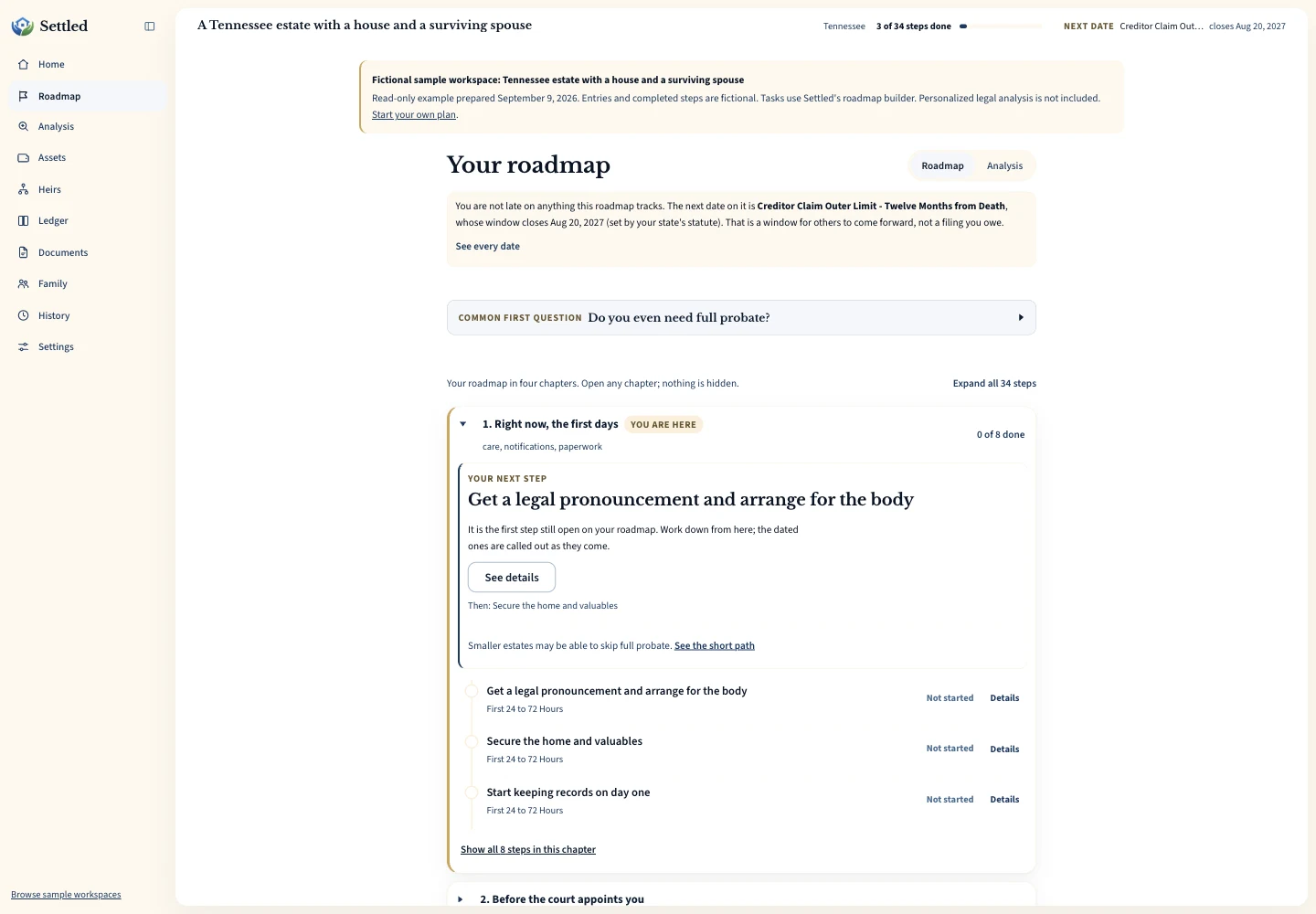
Inspect the same fictional records as a PDF summary, CSV ledger or data export.
How executor task management software shapes the plan
A useful task plan begins with the person's state, date of death, will status, known property, family circumstances, and the role of the person answering. Settled can route an estate toward no-probate, small-estate, summary, formal-probate, or unclear paths based on the supplied facts. That result is an informational assessment, not a court decision. Unknown answers remain reasons to verify the route.
The plan works for more than an appointed executor. A person named in a will can collect documents and prepare questions before appointment. An administrator handling a no-will estate can organize the same kinds of property and money work. A relative can help gather information while another person serves. Each person should describe their status accurately because using a task list does not grant legal authority.
The IRS uses “personal representative” for an executor, administrator, or another person in charge of a decedent's property, and describes collecting assets, paying creditors, filing applicable returns, and distributing property among the role's federal concerns. Read IRS Publication 559 for the current federal tax context. State probate work and authority still depend on local law and the estate.
Track the event that a date runs from
A date is useful only when its starting event is right. Some work relates to the date of death. Other work begins after the court appoints a representative, after notice is published, after a claim is received, or after another event. Settled stores different anchors so a rule that depends on appointment is not silently calculated from death.
When an anchor is unknown, the plan can identify the event needed to calculate later work. Add an appointment date only after you have the issued papers. Add a publication date from the actual notice record. If the event never applies to the estate, do not invent one to fill the field. Ask the court or attorney how the rule applies when notice, service, or timing is disputed.
The distinction appears in federal material too. The current IRS Form 56 instructions ask for a date of death for some estate roles and a date of appointment or asset transfer for others. That form does not set state probate deadlines, but it illustrates why a single universal starting date cannot describe every fiduciary event.
Use a simple weekly task routine
Start each week with overdue and upcoming dated items, then review tasks waiting on another person. Choose one next action for every open item: call the clerk, request a statement, locate a deed, send a document to counsel, or wait for a recorded event. A task named “handle house” hides too much. A task tied to the actual question makes the next session easier.
Mark work done only after the event has happened. Mailing a request and receiving the requested certificate are different events. Preparing a distribution list and delivering property are different events. Use the status to reflect the current point, and keep the document or transaction that supports completion in its proper workspace.
End the review by checking whether new facts changed the plan. A beneficiary designation can change which property appears in the probate inventory. A newly found account can add notice, valuation, income, and transfer questions. A court appointment date can make a previously conditional date calculable. Treat the plan as a working record, not a static checklist printed on the first day.
Keep a short waiting list for replies from courts, banks, insurers, appraisers, and family. Record the request date, what was requested, and the next follow-up point. Do not mark the underlying estate task complete merely because a message was sent. That separation shows which work is in your control and which work depends on an outside response.
Connect each task with the record it produces
A task should leave evidence. An asset search produces a statement, title record, or correspondence. A bill payment produces a ledger entry and receipt. A sale produces a closing statement and proceeds. An appointment produces letters or a court certificate. Store those files in estate document organization software and use plain names that match the task.
Financial tasks should also update the underlying record. Adding “value the car” to a list helps with planning, but the useful result belongs in the estate inventory. Paying an appraisal bill belongs in the ledger. Recording the result where later accounting uses it prevents the task list from becoming a second, conflicting source of truth.
Keep correspondence when an organization refuses or delays a request. The refusal may show that appointment proof is missing or that the request went to the wrong office. The FDIC notes that a bank may ask for a death certificate and court appointment proof when someone seeks another person's account information. See the FDIC guidance, then ask the specific bank what it requires.
Treat reminders as prompts to verify the work
Paid Settled plans include reminders for dated work. A reminder can bring a saved task back to attention, but it cannot know about a paper notice you did not enter, a hearing the court moved, or a fact that changes the rule. Open the task, check its source and anchor, and compare it with current court communications before acting.
Email delivery was not exercised in the September 2026 product audit, so this page does not promise that every message will arrive. Keep important dates on a personal calendar as well, use more than one notification method when the risk warrants it, and do not wait for a marketing or software email before reading court mail.
Reminders work best for known, entered milestones. An unknown publication date cannot support a reliable date that runs from publication. A task with a conditional rule may need an attorney or clerk to resolve the condition. The software should help surface that missing fact, while the decision remains with the authorized source or professional.
Choose task software by the exceptions it can hold
A printable checklist is enough when you need orientation and the estate is simple. Use theexecutor checklist for that overview. Software adds value when dates depend on later events, several people contribute, tasks create financial records, or the plan needs to change as assets and authority become clear.
During a trial or preview, test uncertainty. Can you say that beneficiary status is unknown? Can the plan wait for an appointment or publication date? Can you see why a task exists and where to verify it? A long list with no source or condition can look reassuring while giving you little help with the decision that actually blocks progress.
Settled's preview and 10 assistant questions are free. The complete plan costs $19.99 once for one estate and opens the fuller plan, working tools, reminders, and unlimited assistant questions. Review the current terms at the Settled product page. If your main need is legal representation or direct estate administration, choose a professional service rather than a self-directed task workspace.
Frequently Asked Questions
Does Settled calculate every executor deadline?
Can I use it before appointment?
Are reminders included in the free preview?
Can I assign tasks to a family member?
Should I also keep dates on my calendar?
Keep working through your options
Get a plain overview of common estate work.
Probate timeline guideLearn why estate timing changes with the state, procedure, and facts.
Estate inventory softwareCarry asset-finding tasks into the estate record.
Executor software overviewSee how tasks connect with money, documents, and family work.
Sources and checking dates
Product pages can change between checks. Confirm the price, included features and terms on the provider’s site before paying.
- The Settled Workspace: Probate, Step by Step. Settled Estate. Publication date not stated. Checked 2026-10-01.
- Publication 559 (2025), Survivors, Executors, and Administrators. Internal Revenue Service. Published 2026. Checked 2026-09-09.
- Instructions for Form 56 (06/2026). Internal Revenue Service. Published June 2026. Checked 2026-09-09.
- How to Find a Long Lost Bank Account or Safe Deposit Box. Federal Deposit Insurance Corporation. Published December 2020. Checked 2026-09-09.
Settled Estate is not a law firm, and this content is for informational purposes only and does not constitute legal advice. Probate laws and procedures in your state can change. Consult with a qualified attorney for advice specific to your situation. Full disclaimer.