Estate accounting software for the records you keep
Estate accounting software in Settled Estate connects the inventory and ledger for one estate. the free preview comes first and the complete plan costs $19.99 once per estate. Offer checked 2026-10-01.
Free preview and 10 assistant questions. Working tools cost $19.99 once per estate. See what is included.

By Settled Estate Editorial Team · Checked
Estate accounting starts long before someone asks for a final statement. Each value, deposit, bill, sale, personal outlay, and distribution creates part of the history. Settled lets you record those events as they occur, then calculates a charge-and-discharge view from the estate inventory and ledger. The output gives an executor, administrator, attorney, or accountant an organized statement to review.
Settled does not connect to a bank feed, reconcile a statement independently, prepare a tax return, or certify that an accounting matches a court's form. It imports CSV and TSV files, keeps the entries you approve, and shows how the recorded figures fit together. Read the educational probate accounting guide before deciding what your court or estate requires.
What we checked. Settled accounting, transaction import, asset sale, and pricing details were checked on September 9, 2026. The statement is a working record for review and is not presented as a court-approved local form.
See the working tools
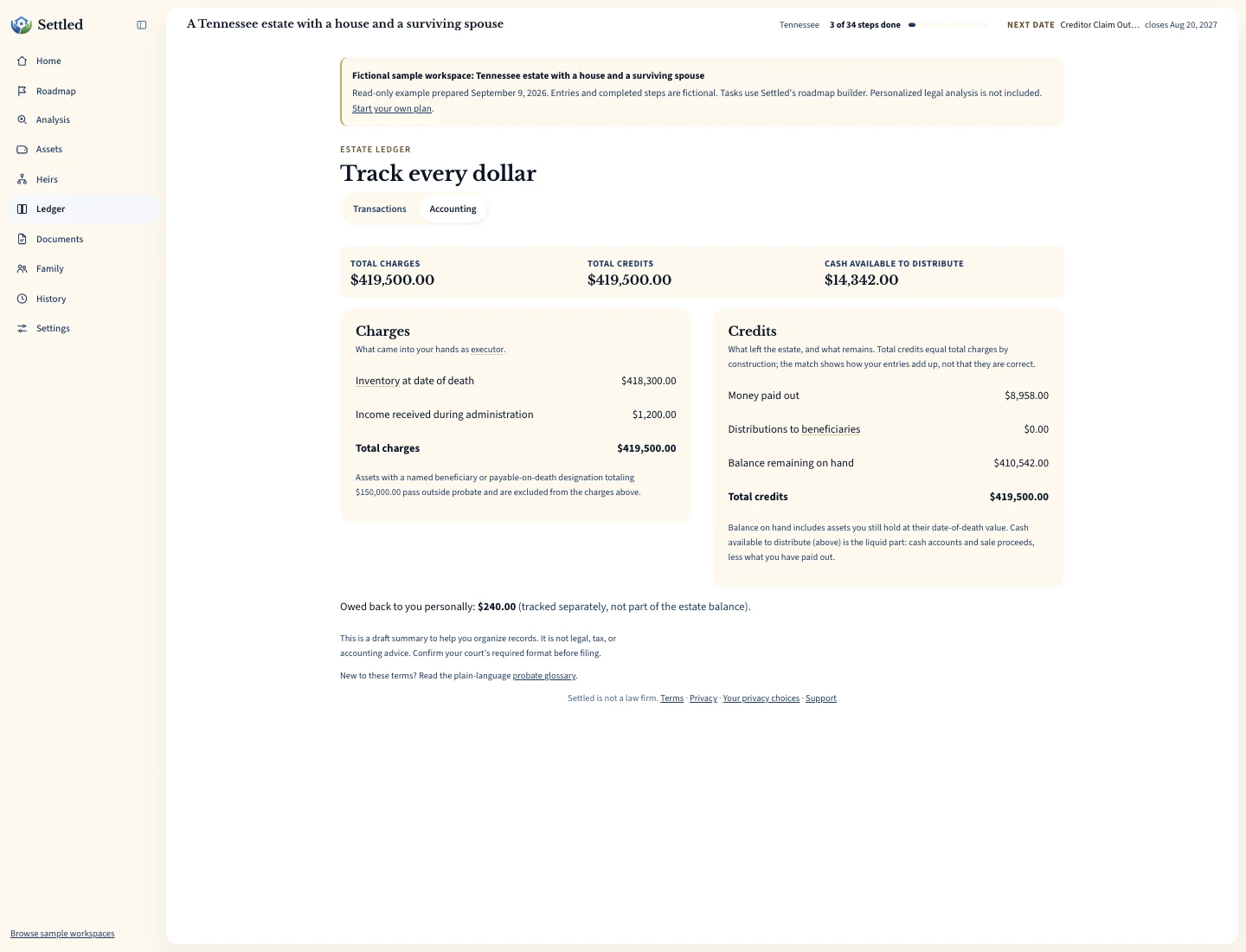
Inspect the same fictional records as a PDF summary, CSV ledger or data export.
What estate accounting software includes in a statement
Settled uses a charge-and-discharge structure. Charges include the recorded probate inventory at date-of-death value, money received during administration, and gains recorded when an inventoried asset sells above its carrying value. Credits include recorded losses, payments, distributions, and the remaining balance on hand. The statement also identifies assets marked as passing to a named beneficiary outside the probate column.
That structure answers a practical question: what property and money did the representative become accountable for, and what happened to it? The answer depends entirely on the entries. A missing account stays missing. A payment placed in the wrong category affects the output. An uncertain beneficiary designation should remain uncertain until someone checks the account contract, deed, or other controlling record.
The IRS explains that a personal representative's federal responsibilities can include collecting estate assets, paying creditors, filing applicable returns, and distributing the remainder. It also explains that an estate may receive income and realize gains or losses during administration. Those federal tax concepts are described in Publication 559. Settled's categories can help organize the underlying events, but the statement is not a Form 1041 or another tax form.
Start the estate accounting with the inventory
Add each known asset with a clear name, type, reference detail, and date-of-death value when known. Real estate can carry its location. Each asset also asks whether it had a named beneficiary or another transfer arrangement. You can answer yes, no, or unknown. This field affects whether the value enters the probate inventory calculation, so treat it as a legal and ownership fact to verify rather than a guess that makes the total look finished.
Record a later sale on the asset. Settled compares net proceeds with the recorded date-of-death value and carries the difference into the gain or loss portion of the accounting. Do not also enter the full sale proceeds as ordinary money in, because that would count the same property twice in this calculation. Income received from the property, such as rent or interest, belongs in the ledger as a separate receipt.
Valuation and ownership can require outside help. The IRS notes that the legal owner of property and the tax treatment of a sale can depend on local law and the way an estate holds the asset. Keep appraisal letters, statements, deeds, and sale records with the estate. Use the estate inventory software guide for a field-by-field workflow.
Record money in, money out, distributions, and reimbursements
The ledger separates four kinds of activity. Money in covers estate receipts such as interest, rent, refunds, and other income received during administration. Money out covers bills and costs paid from estate funds. Distribution records property or money delivered to a beneficiary. Reimbursable records a cost someone paid personally and may seek to have the estate repay. Keeping those meanings separate makes the later review easier.
Each entry can include a date, amount, description, and supporting context. Write a description that another person can understand without seeing the bank line. “County filing fee for appointment petition” is more useful than “check.” Keep the receipt or invoice and note who paid it. The executor expense tracker explains how to separate personal outlays from compensation for the representative's time.
A distribution deserves the same care as a bill. Record the date, recipient context, and amount only after the distribution occurs. The accounting output can show what you entered, but it cannot determine whether the distribution was authorized, whether creditor claims are resolved, or whether a reserve should remain. Ask counsel or the court before moving estate property when those questions are open.
Import a bank or spreadsheet export without claiming a bank connection
Settled accepts comma-separated and tab-separated transaction data. You can paste rows, choose a file, or drop a file into the import flow. The mapping step looks for date, description, amount, debit, and credit columns. Review that mapping before you add anything. A positive number in one bank export may mean a credit while the same sign means something else in another file.
The import preview classifies proposed rows and flags a likely duplicate when an existing entry has the same date, amount, and normalized description. That check helps catch a repeated upload, but it cannot know that two identical payments on one day were both real. Review duplicates rather than deleting them mechanically. One import batch is capped at 500 rows, so split a longer history into reviewable periods.
This is file import, not bank synchronization. Settled does not sign in to the financial organization, continuously fetch transactions, or compare the ending ledger balance with an official bank balance. Keep the original statement. After import, compare the date range, opening and ending balances, and every excluded or adjusted row. The FDIC's consumer guide notes that a bank may ask for a death certificate and proof of appointment before disclosing another person's account information. Read the FDIC account search guidance and ask the bank what it requires.
Review the calculated balance before you rely on it
A mathematical balance answers whether the recorded charges equal the recorded credits and property still on hand. It does not establish that the record matches the bank. Start the review outside the software: gather each statement, closing document, receipt, cancelled check, distribution acknowledgment, and appraisal. Then trace the source record into the inventory or ledger and trace the entry back to the source.
Look for common breaks. An asset sale entered as new income may duplicate its value. A personal filing fee may appear as an estate payment even though reimbursement has not happened. A retirement account with a named beneficiary may sit in the probate inventory because its status was left unknown. An unsold house belongs in property on hand rather than liquid cash. Settled can show a warning when recorded liquid cash appears insufficient, but that warning reflects entered data.
Ask a reviewer to focus on the uncertain items, not only the final total. An accountant can assess income, basis, gains, deductions, and tax reporting. An attorney can assess title, distribution authority, court format, and disputed expenses. The court can tell you which local forms and filing steps apply. Bring the statement and source documents together so the reviewer can find the reason behind each number.
Keep fiduciary accounting and tax accounting distinct
An estate accounting for beneficiaries or a probate court and a federal income tax return answer different questions. The IRS says Form 1041 reports an estate's income, deductions, gains, losses, accumulated or distributed income, and tax liability when the filing rules apply. Review the current IRS Form 1041 page with a tax professional. A Settled category does not decide how a transaction appears on that return.
The date-of-death value can serve one purpose in the estate record while basis and later sale treatment require a tax analysis. Reimbursement may affect the fiduciary account yet require different support for tax purposes. Executor compensation is separate from a repayment of the executor's own cost. Keep descriptions and documents precise enough that the professional can make those decisions without reconstructing the event from memory.
Settled's export is a handoff tool. It does not submit a return or turn the ledger into tax advice. When tax filing applies, retain the filed return, schedules, professional workpapers, and notices outside any single software system as well. The IRS says records related to Form 1041 should be kept as long as their contents may matter in administering federal tax law.
When Settled accounting fits and when to choose another tool
Settled fits a family representative who wants the financial record connected with tasks, assets, documents, and family help. The one-time $19.99 complete plan applies to one estate. The free preview and 10 assistant questions let you evaluate the plan before opening the paid tools. See the current terms on the Settled product page.
Choose a deeper finance product when your leading requirement is continuous bank download, principal-and-income allocation, professional firm controls, many client estates, or a jurisdiction-specific report that a vendor has expressly verified. Choose an accountant or attorney when the estate has disputed ownership, tax elections, insolvency, business operations, beneficiary conflict, or a filing you do not understand.
A spreadsheet can still work for a short estate when one careful person owns the record and understands the formulas. The risk grows when the asset list, transaction file, receipt folder, and distribution notes drift apart. Compare a spreadsheet with executor software based on the number of handoffs and uncertain facts, not the number of rows alone.
Frequently Asked Questions
Does Settled reconcile the ledger to the estate bank account?
Is the accounting accepted by every probate court?
Can Settled prepare Form 1041?
How does Settled treat an asset sale?
Can I import a spreadsheet?
Keep working through your options
Learn the purpose of an executor account and the records behind it.
Estate bank account guidePrepare for account opening and recordkeeping questions.
Track executor expensesSeparate personal outlays, estate payments, and compensation.
Executor software overviewSee how accounting connects with tasks, documents, and family work.
Sources and checking dates
Product pages can change between checks. Confirm the price, included features and terms on the provider’s site before paying.
- The Settled Workspace: Probate, Step by Step. Settled Estate. Publication date not stated. Checked 2026-10-01.
- Publication 559 (2025), Survivors, Executors, and Administrators. Internal Revenue Service. Published 2026. Checked 2026-09-09.
- About Form 1041, U.S. Income Tax Return for Estates and Trusts. Internal Revenue Service. Publication date not stated. Checked 2026-09-09.
- How to Find a Long Lost Bank Account or Safe Deposit Box. Federal Deposit Insurance Corporation. Published December 2020. Checked 2026-09-09.
Settled Estate is not a law firm, and this content is for informational purposes only and does not constitute legal advice. Probate laws and procedures in your state can change. Consult with a qualified attorney for advice specific to your situation. Full disclaimer.