Executor collaboration software for shared work
Executor collaboration software in Settled Estate lets trusted helpers edit one shared estate. the free preview comes first and the complete plan costs $19.99 once per estate. Offer checked 2026-10-01.
Free preview and 10 assistant questions. Working tools cost $19.99 once per estate. See what is included.

By Settled Estate Editorial Team · Checked
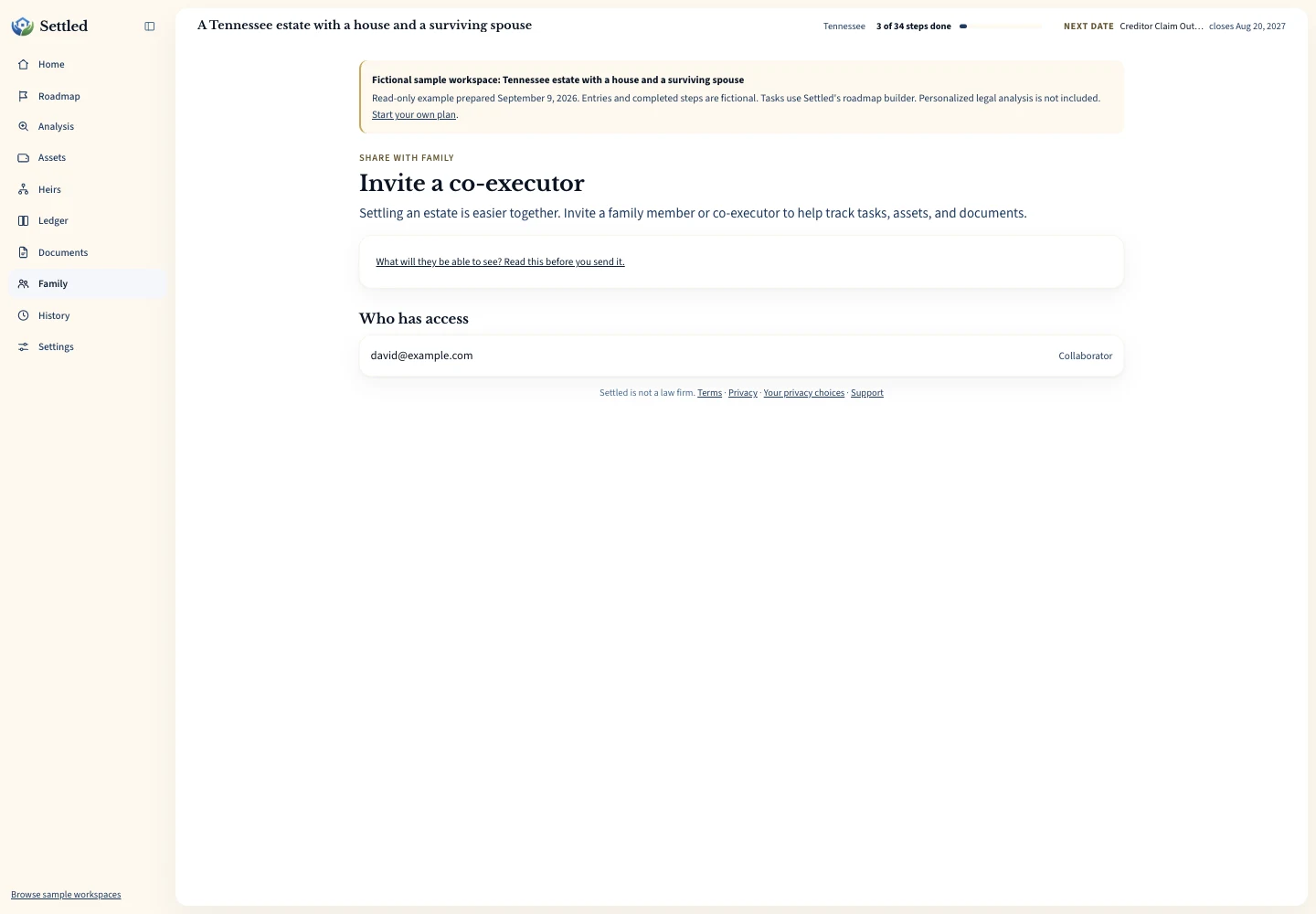
Estate work often involves more than one person even when only one person holds the formal appointment. A sibling may gather account statements, a spouse may photograph property, and a co-executor may update tasks. Settled lets the estate owner invite collaborators so that work stays in the same task, asset, money, document, and family record.
Collaborators can edit. Settled does not offer a beneficiary-only, read-only portal through this feature. An heir contact record also does not give that person access. Choose helpers based on what they need to do, explain the boundary before sending an invitation, and remove access when the work ends.
What we checked. Settled invitation, member access, activity attribution, and pricing details were checked on September 9, 2026. No invitation email was sent during that review, which was not a full access-control or security assessment.
See the working tools
Inspect the same fictional records as a PDF summary, CSV ledger or data export.
What executor collaboration software permissions mean
Court appointment and workspace access answer different questions. Appointment papers may authorize an executor or administrator to act for an estate. A Settled invitation allows a person to participate in the software record. It does not let that person sign for the estate, obtain bank information, sell property, make distributions, or represent the estate before an agency.
The IRS Form 56 instructions distinguish executors authorized by a court, administrators in no-will estates, and certain people acting without a court appointment. They also say a filer must be prepared to substantiate fiduciary authority. Read the official Form 56 instructions. A collaborator should never describe software access as proof of one of those legal roles.
This allows a practical division. The appointed representative can retain decisions and signatures while a trusted helper gathers facts, uploads a statement, or organizes receipts. A co-executor can work in the same record, while the will, appointment order, and local law still govern whether co-executors must act together. Use the co-executors guide to identify questions for counsel.
Invite a collaborator with a defined job
Before inviting someone, write down the work you expect them to handle. They may collect insurance records, enter household property, match receipts to expenses, or update the status of assigned calls. A defined job reduces overlapping edits and gives the owner a clear point for reviewing access later.
Send the invitation to an address controlled by that person. Settled can provide a link for manual sharing when needed, and a refreshed link makes an earlier link stop working. A pending invitation can be revoked. Do not forward an invitation through a broad family thread or store the link in a document available to people who should not enter the estate.
Ask the recipient to confirm what the workspace contains before accepting. Estate records can include names, relationships, asset references, values, bills, and private files. Share only when access serves the estate work. A person who only needs a status update may be better served by a separate summary prepared by the representative.
Use a short orientation after acceptance. Show the helper where open tasks live, how unknown asset status is recorded, which money entries need representative review, and how drafts are labeled. Agree that legal questions stay open until an official source or professional resolves them. A shared vocabulary prevents one person's “done” from meaning another person's “request sent.”
Coordinate edits inside one shared estate
Set a simple rule for each area. One helper might maintain documents, another might gather asset facts, and the representative might approve money entries and task completion. The software provides shared access and activity attribution. The family still needs to agree on who checks facts and who decides that a record is ready to rely on.
Use descriptions that make edits understandable. When adding an account, include the organization and a safe reference. When entering an expense, name who paid and attach the receipt. When marking a task done, make sure the actual event occurred. This keeps another collaborator from repeating the call or assuming that a draft document was filed.
Review uncertain fields together. An asset's beneficiary status can remain unknown while one person requests the form. A task date can wait for an appointment or publication event. An expense can stay in the reimbursable category while counsel reviews it. Collaboration is most useful when uncertainty stays visible instead of being resolved by the first person to click a button.
Hold a brief recurring review when several people are active. Check recent changes, unresolved entries, upcoming dates, missing files, and tasks waiting on outside replies. End with a named owner for each next action. The activity record can help explain what changed, while the family conversation supplies the purpose and decision behind the edit.
Keep beneficiary records separate from collaborator access
Settled can keep heir and family contact records, including relationship and notes. Those records help the representative organize communications and questions. They do not determine inheritance rights, and they do not create a login. A named person becomes a workspace collaborator only through the invitation and membership process.
This separation protects clarity. A beneficiary may need information but should not edit estate records. A bookkeeper or sibling may need to edit records without being a beneficiary. Do not invite every contact by default. Decide whether the person will perform work in the system and whether they should see the information already stored there.
The IRS describes a personal representative's fiduciary responsibility to recipients of estate income and property, and federal filing can require beneficiary information in some estates. Review Publication 559 with a tax professional. Settled's contact and collaborator labels do not determine who is a beneficiary for probate or tax purposes.
Set family rules for money and document work
Financial entries deserve a second review. Ask one person to enter imported transactions and another to compare the result with the statement. Pair personal outlays with receipts and identify the payer. Record distributions only after they occur. A collaborator's ability to edit a number does not authorize the underlying payment or distribution.
Documents deserve the same care. Upload files needed for the estate record and use names that reveal their purpose without exposing extra account details. Agree on whether drafts belong in the workspace and how they are labeled. The software stores and retrieves files; it does not decide which family members have a legal right to receive them.
When a disagreement starts, pause the disputed edits. Export or preserve the current record, identify the source documents, and ask the representative or professional to resolve the question. Avoid turning a shared workspace into a place where family members overwrite one another's versions of ownership, value, or distribution facts.
Keep private family discussion out of factual fields when it does not help administer the estate. Notes should explain the source, status, or next question. Personal accusations and speculation make a later professional handoff harder and expose more sensitive information to every collaborator. Move a dispute to counsel while keeping the workspace record neutral and tied to source documents.
Review, revoke, and remove access deliberately
Review the member list after a project ends and before adding more sensitive records. The owner can revoke a pending invitation that should no longer be accepted. The owner can also remove an existing collaborator. A collaborator can leave. These controls change future access rather than erasing work already saved in the estate.
Removal should follow a handoff. Confirm that source documents have been uploaded, open tasks identify their next owner, and unexplained entries have notes. Ask the departing helper to delete downloaded copies when appropriate, recognizing that software removal cannot retrieve a file someone already saved elsewhere.
Access review also belongs on the task list after a family conflict, address compromise, or role change. Settled checked the invitation and removal workflow in September 2026, but that review was not a security certification. Use a strong email account and contact support if an invitation or member entry looks unfamiliar.
Choose collaboration software for the access you really need
Settled fits a small group of trusted people who need to edit one family estate together. It keeps the task list, inventory, ledger, files, and contacts in the same estate workspace. The complete plan costs $19.99 once per estate. The free preview and 10 assistant questions let the owner assess the process before paying.
Look elsewhere when your main requirement is a read-only beneficiary portal, document-only guest access, separate permissions for each section, staff administration across many client estates, or a professional case-management service. Those are different access models. Do not assume that the word “sharing” means a product supports them.
Before inviting real family members, review the current offer on the Settled product page and decide what records will live in the workspace. Then send one invitation, agree on a limited first task, and review the change together. That short trial tells you more about family fit than a long feature list.
Frequently Asked Questions
Are collaborators read-only?
Does adding an heir give that person access?
Does collaborator access make someone a co-executor?
Can an invitation be revoked?
Can an administrator with no will use family sharing?
Keep working through your options
Understand shared appointment questions and ways to reduce deadlock.
Executor task managementCoordinate work and dated milestones in the shared record.
Estate document organizationKeep source files available to the trusted people doing the work.
Executor software overviewReview the full estate workflow and current free preview.
Sources and checking dates
Product pages can change between checks. Confirm the price, included features and terms on the provider’s site before paying.
- The Settled Workspace: Probate, Step by Step. Settled Estate. Publication date not stated. Checked 2026-10-01.
- Publication 559 (2025), Survivors, Executors, and Administrators. Internal Revenue Service. Published 2026. Checked 2026-09-09.
- Instructions for Form 56 (06/2026). Internal Revenue Service. Published June 2026. Checked 2026-09-09.
Settled Estate is not a law firm, and this content is for informational purposes only and does not constitute legal advice. Probate laws and procedures in your state can change. Consult with a qualified attorney for advice specific to your situation. Full disclaimer.