Executor software vs spreadsheets for estate records
Executor software vs spreadsheets is a choice between built-in estate structure and manual control. A workbook may fit a small estate with a careful owner. Settled Estate costs $19.99 once and joins tasks, records, documents, collaborators, and file-based transaction imports across 50 current states and D.C. Settled price checked October 1, 2026.
Free preview and 10 assistant questions. Working tools cost $19.99 once per estate. See what is included.
By Settled Estate Editorial Team · Checked
A spreadsheet is a sound choice when the estate is small, the recordkeeper knows the required categories, and one person will guard formulas and versions. Executor software earns its cost when task logic, connected records, document links, sharing controls, repeatable imports, or structured reports would otherwise need to be built by hand.
What we checked. We inspected Settled code and focused tests. The spreadsheet evaluation uses a transparent fictional estate and ordinary workbook capabilities, not a claim that we tested every Excel or Google Sheets version. Formulas and sharing behavior depend on the chosen spreadsheet setup.
Executor software vs spreadsheets: when does each fit?
Use a spreadsheet when the estate has few accounts and transactions, the owner can design and audit the workbook, and the court or accountant has already stated the reporting categories. Use executor software when the user needs guidance beside the records or when many people, assets, files, dates, and financial events must stay connected.
Scroll across to compare all columns.
| Decision point | Settled executor software | Excel or Google Sheets |
|---|---|---|
| Setup | Estate intake creates a shaped plan and record structure | Owner creates tabs, columns, validations, formulas, categories, and instructions |
| Tasks and dates | Tasks, conditional dates, reminders, and status live beside estate facts | Dates and dependencies require manual entry, formulas, calendar rules, or a separate task system |
| Money | Manual, pasted, CSV, or TSV entry with estate-specific accounting logic | Flexible imports and formulas, but the owner maps, classifies, balances, and audits every rule |
| Documents | Document workspace and links within the estate record | Links or file names can sit in cells; actual files need a separate controlled folder |
| Sharing | Collaborators can edit estate information; no read-only heir portal | Platform sharing may allow view, comment, or edit; the owner must protect ranges and sensitive data |
| Output | Entered data is downloadable as CSV or JSON without payment; paid access adds full generated task details and PDF summaries | Any report the owner can build, subject to formula accuracy and a stable print layout |
| Price | $19.99 once per estate | May be no added purchase if software is already available; owner time and review still carry a cost |
The workbook's flexibility is both its strength and its main risk. A column can represent anything, but it carries no estate meaning until someone defines it. Software adds opinions about the relationship between a task, asset, transaction, person, document, and report. The executor must decide whether those built-in relationships save enough work to justify using a dedicated product.
A side-by-side walkthrough with the same fictional estate
Consider the fictional Estate of Lena Ortiz. It has a home valued at $310,000 on the inventory date, a checking account with $18,400, a brokerage account with $72,000, a car, twelve expenses, three beneficiaries, and one co-executor. The home later sells for $325,000. The executor reimburses herself $1,240 and makes a $20,000 partial distribution.
Building the workbook
A useful workbook needs at least an asset register, transaction ledger, expenses and reimbursements, debts, beneficiaries and distributions, task list, source index, and report tab. Each financial row needs a stable ID, date, amount, account, category, related asset or person, source document, cleared status, and notes. The owner must decide whether a sale belongs in one row or several linked rows and how the report separates proceeds, gain, cash, and property no longer held.
The home sale reveals formula risk. Subtracting $310,000 from $325,000 gives a $15,000 difference before sale costs, but that does not tell the executor the tax basis, taxable gain, report treatment, or distributable cash. A workbook can calculate exactly the formula entered, including a legally or financially wrong formula. Keep valuations, closing papers, and professional advice separate from the arithmetic.
Using Settled
Settled supplies estate-specific records and calculations. Its accounting model distinguishes gains and losses, charges and credits, cash and assets still held, expenses, reimbursements, and distributions. The executor can import a transaction file, review mappings, and keep financial work beside the asset and family records. Review the published workspace.
The built-in model reduces workbook design, but it does not remove review. Each file import accepts up to 500 rows. There is no live bank feed. An internally balanced report does not establish that all statement activity was captured. A downloadable summary does not establish that a court accepts the result. The executor must compare source documents, correct classifications, and confirm required forms.
Completing the same task
Suppose the co-executor pays a $460 property bill and uploads the receipt. In a workbook, someone enters the row, chooses the category, links the receipt, updates the reimbursement total, and protects the formula. In Settled, the event can sit in the estate's expense and reimbursement structure beside its document record. Either path works if the source, authority, category, and review are sound. Software reduces custom setup; the workbook gives the owner full control.
What should a good executor spreadsheet contain?
A workbook should make every number traceable. Start with the estate inventory guide and its downloadable estate inventory CSV. The template is a starting point for assets, not a complete accounting system.
Scroll across to compare all columns.
| Tab | Useful fields | Control to add |
|---|---|---|
| Assets | Asset ID, description, title, financial company, inventory value and date, later value, disposition, source | One stable ID used by every related transaction and document |
| Transactions | Date, account, description, amount, category, asset ID, beneficiary ID, cleared status, source | Category validation and a duplicate check |
| Expenses and reimbursements | Payee, purpose, payer, date, amount, authority, receipt, repayment date | Separate estate-paid and personally paid amounts |
| Debts and claims | Creditor, notice, amount asserted, amount allowed, payment, dispute status, source | Do not let a tracking status decide legal validity |
| Beneficiaries and distributions | Person ID, contact, share description, proposed item, value, date, receipt | Keep identifying data and access permissions outside a broadly shared sheet |
| Tasks | Owner, status, trigger date, due date, source, proof, next review | Use a cited legal source and manual verification for each consequential date |
| Documents | Document ID, name, related record, location, date, version, retention note | Store files in a backed-up folder with consistent names |
| Report | Opening property, changes, receipts, disbursements, distributions, closing property | Lock formulas and reconcile totals to source statements |
Add a read-me tab. Define each category, sign convention, formula, date basis, status, and document path. Record who may edit and who reviews changes. Without that page, a co-executor may interpret a negative amount, “paid” status, or inventory date differently.
Use data validation for categories and status. Avoid typing beneficiary names differently across tabs; assign IDs. Protect formula columns. Keep a dated copy before structural changes. Reconcile each account to statements by a stated cutoff. Export a PDF of each reporting period so later formula edits do not silently rewrite history.
Rubric, strengths, and limits of both approaches
We compare task logic, estate records, money, sharing, help, and total cost. The original information here is the field-level walkthrough of the same fictional estate. We make no claim that one workbook represents every spreadsheet. We also follow published review guidance by stating evidence and drawbacks.
Reasons to choose Settled
- The estate record already connects tasks, people, assets, documents, and financial activity.
- File import and estate-specific calculations reduce workbook design.
- Conditional dates and reminders can respond to estate facts.
- The $19.99 one-time cost is predictable for one estate.
Settled limitations
- It currently supports 50 states and D.C. rather than every location.
- It has no live bank feed and requires file or manual transaction intake.
- Collaborators can edit estate information, which may be too much access for a beneficiary.
- Built-in reports and summaries still require source review and may not match a court form.
Reasons to choose a spreadsheet
- The owner controls every field, category, formula, and report.
- Existing software may avoid another purchase.
- View-only sharing can support a carefully limited status report.
- A professional can shape the workbook to an already known local accounting format.
Spreadsheet limitations
- The owner must design and audit formulas, validations, categories, and links.
- No task or legal date adapts without manual rules and maintenance.
- Documents live elsewhere unless the owner builds a stable folder and index.
- Copies, shared edits, hidden cells, and broken references can weaken the audit trail.
- A neat total does not establish statement reconciliation or legal sufficiency.
A simple decision rule for software versus a workbook
Choose a spreadsheet when one skilled owner can state the required categories, the estate has low transaction volume, collaborators need limited access, and the final report format is already known. Build the read-me, validation, locked formulas, document index, reconciliation process, and dated exports at the start.
Choose Settled when the executor would otherwise build several connected sheets and a separate task manager, document index, reminder system, and family record. Check the state boundary and accounting workflow. Use fictional rows before importing private data.
Choose EstateExec instead when direct bank download or deeper accounting is central. Consider Atticus when human support is central. Regardless of tool, ask a lawyer or accountant about disputed rights, taxes, insolvent estates, title, unfamiliar court forms, or accounting requirements.
A hybrid can also work. Keep the formal transaction record in a protected workbook shaped by an accountant, use a dedicated workspace for tasks and documents, and send beneficiaries a limited status sheet. Define which system controls each fact so balances, names, dates, and task status do not diverge. Reconcile the systems at each reporting date and archive the exports together.
See the working tools
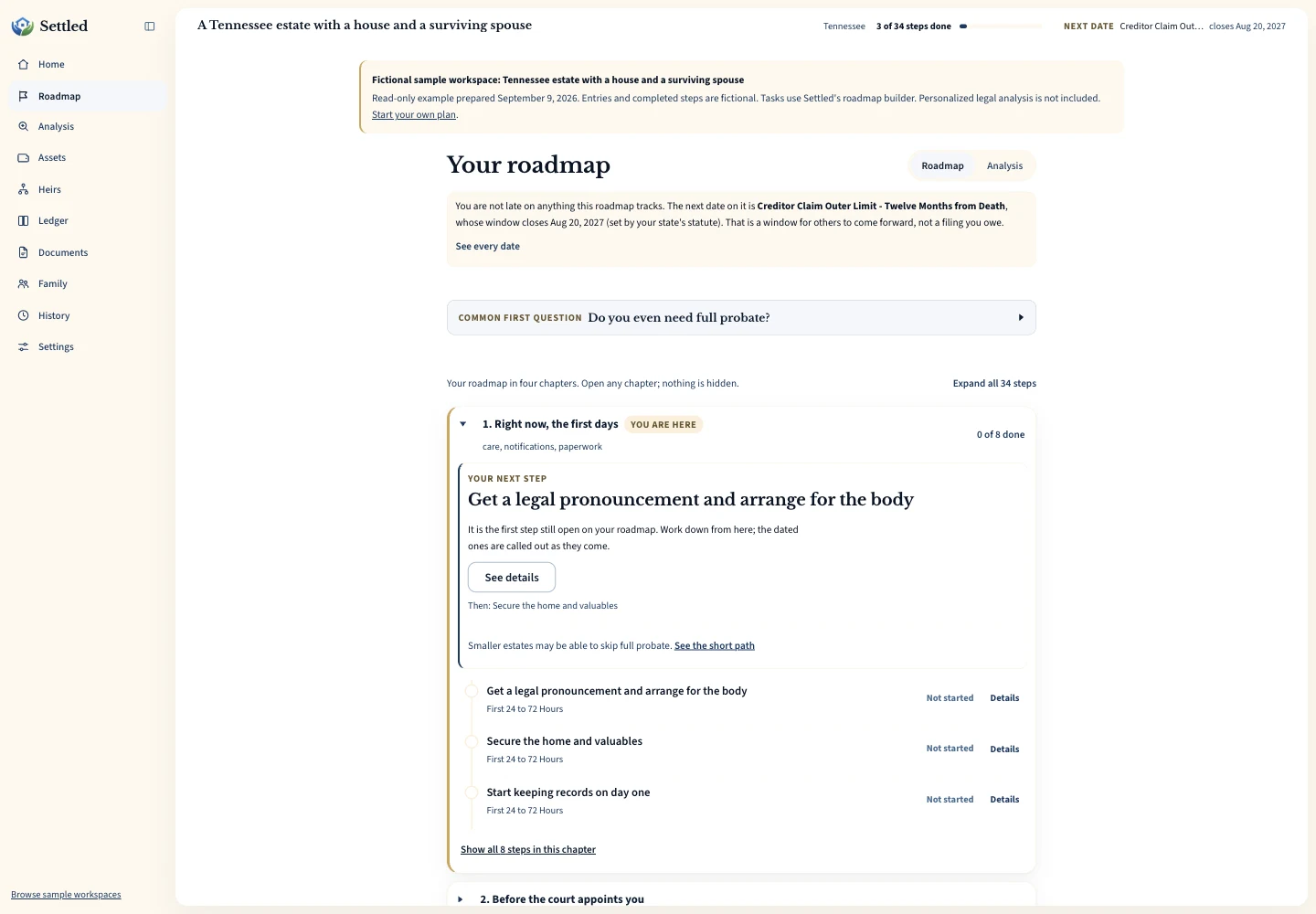
Inspect the same fictional records as a PDF summary, CSV ledger or data export.
Frequently Asked Questions
Can I settle an estate with Excel or Google Sheets?
Is there a free estate inventory spreadsheet?
Does Settled import spreadsheet data?
Is a spreadsheet safer for beneficiary sharing?
Will either option produce a court-ready accounting?
Keep working through your options
See how Settled organizes tasks, records, money, documents, and shared work.
Review methodologyRead how we check product claims and handle our interest in Settled.
Executor software choicesCompare the main options by the work an estate requires.
Estate inventory and CSVStart a useful asset register and download the template.
Sources and checking dates
Product pages can change between checks. Confirm the price, included features and terms on the provider’s site before paying.
- The Settled Workspace. Settled Estate. Publication date not stated. Checked 2026-10-01.
- EstateExec for Accounting. EstateExec. Publication date not stated. Checked 2026-09-09.
- Write high quality reviews. Google Search Central. Published Updated 2025-12-10. Checked 2026-09-09.
Settled Estate is not a law firm, and this content is for informational purposes only and does not constitute legal advice. Probate laws and procedures in your state can change. Consult with a qualified attorney for advice specific to your situation. Full disclaimer.