Settled vs SwiftProbate
Settled vs SwiftProbate compares Settled’s $19.99 current one-time offer with SwiftProbate’s published $39 paid plan. SwiftProbate offers free access and advertises nationwide availability; its public free-task limits need clarification. Settled Estate publishes a fuller working-record model across 50 current states and D.C. Settled price checked October 1, 2026; SwiftProbate pages checked September 9, 2026.
Free preview and 10 assistant questions. Working tools cost $19.99 once per estate. See what is included.
By Settled Estate Editorial Team · Checked
SwiftProbate may suit someone who wants to inspect a task list before paying, after confirming the free limits. Settled is attractive when the buyer wants an estate record that connects work, assets, people, documents, transactions, and reports for one $19.99 payment. Verify state and court details with official sources in either product.
What we checked. We inspected Settled code and focused tests. We checked SwiftProbate public product, pricing, and comparison pages on September 9, 2026. We did not open or buy a SwiftProbate account, so paid feature descriptions remain vendor-attributed.
What separates Settled vs SwiftProbate?
Free-plan check, September 27, 2026: SwiftProbate's pricing section lists task interaction and tracking, while its FAQ describes a sample task list for one asset. We have not tested an account to resolve that difference. Confirm the asset and task limits before deciding that its free plan covers your work.
Compare the current paid prices, the free boundary, and the depth behind each label. SwiftProbate advertises a free level, but its pricing section and FAQ describe different task limits. Its $39 Complete level adds automated research, deadlines, unlimited document storage, estate accounting and exports, family collaboration, chat support, and lifetime account access. See SwiftProbate's current tier list.
Settled offers a free preview and charges $19.99 once for the complete estate workspace. Users can download their entered data as CSV or JSON without paying. Paid access adds the full generated task details and PDF summaries beside asset, heir, expense, transaction, document, reminder, and collaborator records. You can inspect read-only fictional workspaces before starting your own. See Settled's published offer.
Scroll across to compare all columns.
| Question | Settled | SwiftProbate |
|---|---|---|
| What can I do before paying? | Preview the plan and download entered data as CSV or JSON; paid access adds full generated task details and PDF summaries | SwiftProbate offers free access, but its public pages describe the free tier differently. Confirm the current limit before relying on the free plan. |
| What does paid access cost? | $19.99 once per estate | $39 once with published lifetime account access |
| Where is it offered? | 50 states and D.C. currently supported | Public page says nationwide and lists 51 state guides, counting Washington, DC |
| How does money enter? | Manual records, pasted data, or CSV and TSV imports of up to 500 rows at a time | Vendor says running ledger, accounting, and exports; public page does not spell out transaction import mechanics |
| How do people share work? | Collaborators can edit estate information; no read-only heir portal | Vendor says family invitations, permissions, and activity tracking |
| What can this review prove? | Code and focused test evidence, plus public offer | Public vendor claims only; no paid account test |
How do state reach, tasks, and deadlines compare?
SwiftProbate publishes the broader geographic claim. Its home page says “Now available nationwide” and links 51 state guides, a count that includes Washington, DC. It describes tasks shaped by the estate's assets and jurisdiction, with forms, deadlines, instructions, and five to fifteen tasks per asset. Those statements come from SwiftProbate's own page.
Settled currently supports 50 states and D.C. That narrower number is a product boundary worth checking before anything else. Inside that boundary, its task dates can use more than the date of death. Appointment and publication dates can affect calculated work, and some dates are conditional. The executor still needs to enter the right facts and verify each legal date.
A deadline label should prompt action, not end the research. State statutes, court orders, local rules, appointment timing, publication, notice method, and the type of claim can change what applies. Neither company's product page proves that every displayed date fits a particular case. Confirm high-consequence dates with the issuing court, official agency material, or counsel.
SwiftProbate's free access may help someone inspect the task experience, but the differing public descriptions do not establish a fuller free workspace. Settled's free preview helps someone see the plan, and entered data remains downloadable as CSV or JSON without payment. Paid access adds full generated task details and PDF summaries. Buyers should compare what can be edited, exported, and retained at each free boundary rather than compare only “free” badges.
Which product gives clearer accounting and record evidence?
Settled has clearer evidence for the structure of its financial records. Its accounting workflow handles charges and credits, gains and losses, cash and assets still held, expenses, reimbursements, and distributions. Its import flow maps CSV or TSV columns and checks rows before records enter the ledger. This supports a useful family workflow. It does not prove an external bank statement was reconciled, and it does not make a generated packet a court-approved form.
SwiftProbate says its paid tier includes an expense and accounting tracker, a running ledger, charge-and-discharge accounting, and exports. It also says users can associate documents with assets or tasks. Read the product description. Those labels sound close to Settled's workflow. We did not have direct paid access, so we cannot compare field coverage, correction handling, report schedules, export formats, or the exact charge-and-discharge calculations.
This uncertainty changes the buying check. Build a fictional five-entry test: opening bank balance, home sale, funeral reimbursement, interest income, and partial beneficiary distribution. Ask each product how it records the transaction, connects it to an asset or person, handles a correction, and includes the result in an export. A screenshot of a ledger cannot answer those questions.
Document claims also need a close read. SwiftProbate publishes unlimited document storage in Complete and file links to tasks or assets. Settled provides a document workspace and downloadable summaries. Storage and output do not establish filing acceptance. Courts may require their own form, signature, attachments, date range, verification, or service. Keep source documents outside any single vendor until you have confirmed export and retention.
What are the strengths and limits of each product?
We compare task fit, estate records, money workflow, sharing, help, and full cost. We give no rating because the evidence basis differs between the products, as the note above explains. That distinction follows published guidance for evidence-backed reviews.
Reasons to choose Settled
- The $19.99 complete workspace includes estate records and financial calculations.
- CSV, TSV, and pasted imports give a visible path from an account export into the ledger.
- Tasks, contacts, heirs, assets, documents, money, and collaborators sit in one estate record.
- Settled currently supports 50 states and D.C.
Settled limitations
- The product currently serves 50 states and D.C., fewer than SwiftProbate's nationwide claim.
- The complete working workspace requires payment; SwiftProbate's free task limits remain unclear across its public pages.
- There is no live bank feed, and collaborators can edit estate information.
- The public sample is read-only; it does not let you test imports or collaboration.
Reasons to choose SwiftProbate
- Free access lets a user inspect the product before paying; confirm what the account permits before entering estate information.
- The company publishes nationwide reach and a large state, county, and financial-company resource library.
- Its $39 paid plan advertises documents, accounting, exports, collaboration, support, and lifetime access.
- Its Grace assistant may appeal to someone who wants conversational help beside the task list.
SwiftProbate limitations
- Accounting, document storage, family collaboration, and chat support require the paid tier.
- The public page does not provide enough detail to compare import mechanics or final report structure with Settled.
- Broad statements about complete deadlines or filing output still need case-specific verification.
- Its page comparing Settled carries an older state-coverage description, so readers should use current first-party pages for both products.
Why do current Settled facts differ from SwiftProbate’s comparison page?
SwiftProbate's comparison page was marked updated April 24, 2026 and describes Settled as available only in Florida, California, Texas, and Ohio. Settled now supports 50 states and D.C. Product coverage changed after that description. We found no reason to infer intent or criticize SwiftProbate for the mismatch.
The right response is to date the evidence. Settled's current price was checked October 1, 2026; its state count was reviewed September 9, 2026. SwiftProbate's price, free tier, and nationwide statements were reviewed on September 9, 2026. Its comparison hub remains useful for seeing how the vendor frames alternatives, but competitor facts should be checked with the competitor itself.
This rule applies to our page too. Prices, coverage, and features can change. The source list records the page and checked date so a future editor can recheck the claim instead of copying it forward. A buyer should open both current pricing pages before purchase.
Who should choose Settled or SwiftProbate?
Consider SwiftProbate when the estate sits outside Settled's published states or you value its advertised assistant and resource library. Confirm the free task limits before choosing it. Before buying Complete, inspect the ledger fields, export, family permissions, and document retention terms that matter to you.
Choose Settled when the estate is within its current coverage, you want its combined record and file-import workflow, and you are comfortable paying once to work beyond the preview. Inspect the accounting workflow and collaboration model against your estate's actual needs.
Ask a lawyer about disputed appointment, unclear title, creditor conflict, tax exposure, beneficiary objections, or any filing that affects legal rights. A product can organize source material and next actions. It cannot represent a party or guarantee a result.
When the choice still looks even, test the free boundary with the same fictional facts. In SwiftProbate, check whether the free account permits a task plan and marking an item complete. In Settled, inspect the preview and published workflow. Record which questions each intake asks, which tasks cite a source, and what becomes unavailable before payment. Then compare the paid accounting, document, sharing, and export promises line by line.
Plan for the handoff at the end. Ask whether another executor can understand the record, whether an accountant can receive transactions in a usable form, and whether a lawyer can trace a task to its source document. SwiftProbate's lifetime-access statement may matter here. Settled's downloadable estate data may matter too. Confirm current retention and export terms rather than treating either marketing phrase as permanent storage.
See the working tools
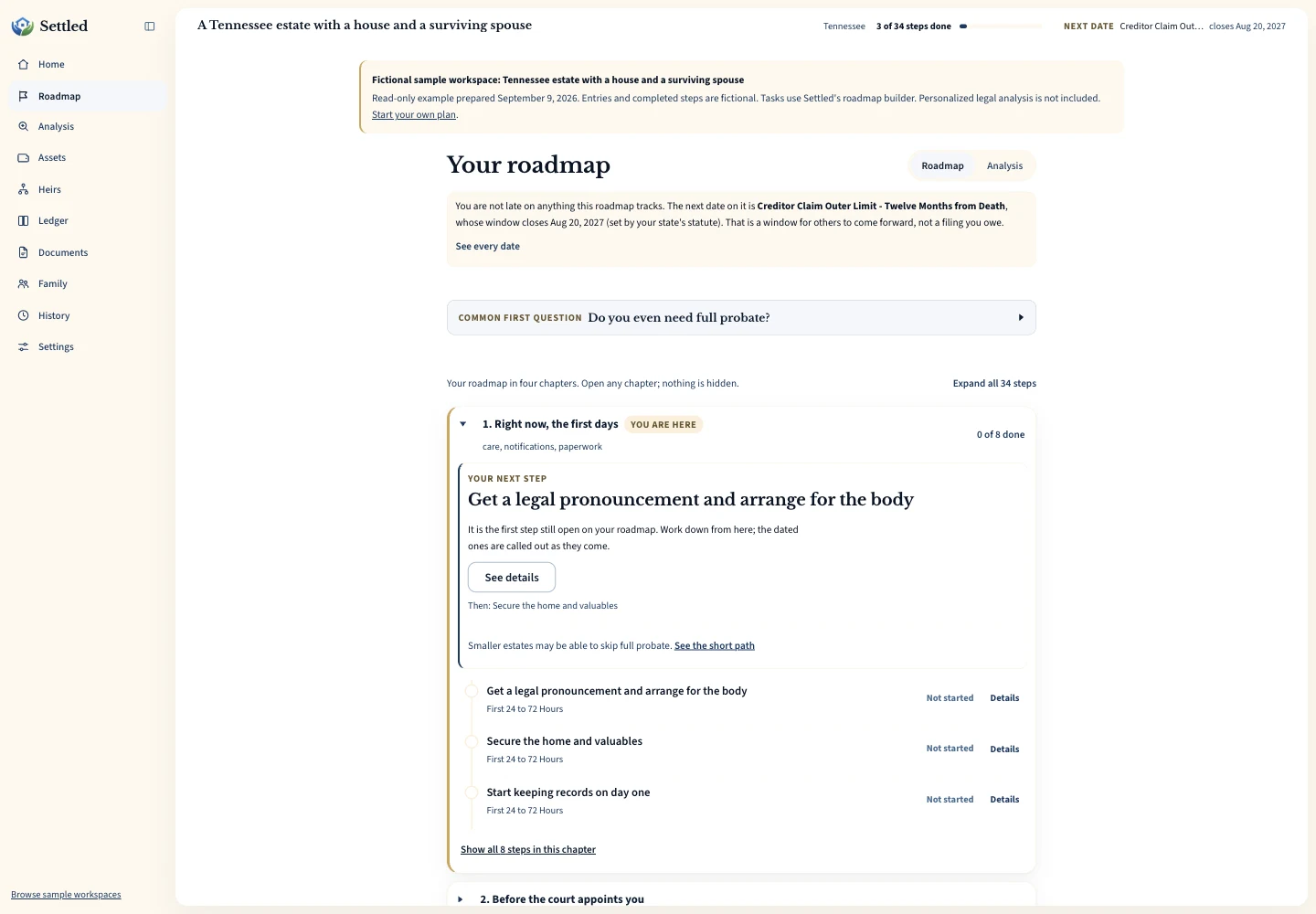
Inspect the same fictional records as a PDF summary, CSV ledger or data export.
Frequently Asked Questions
How do Settled and SwiftProbate prices compare?
Which one is available in more states?
Did Settled test SwiftProbate?
Which has a better free plan?
Can either tool tell me a court deadline with certainty?
Keep working through your options
Sources and checking dates
Product pages can change between checks. Confirm the price, included features and terms on the provider’s site before paying.
- The Settled Workspace. Settled Estate. Publication date not stated. Checked 2026-10-01.
- SwiftProbate product and pricing. SwiftProbate. Publication date not stated. Checked 2026-09-09.
- SwiftProbate FAQ: free and Complete plans. SwiftProbate. Published Publication date not stated. Checked 2026-09-27.
- Compare Probate Tools. SwiftProbate. Publication date not stated. Checked 2026-09-09.
- Write high quality reviews. Google Search Central. Published Updated 2025-12-10. Checked 2026-09-09.
Settled Estate is not a law firm, and this content is for informational purposes only and does not constitute legal advice. Probate laws and procedures in your state can change. Consult with a qualified attorney for advice specific to your situation. Full disclaimer.